
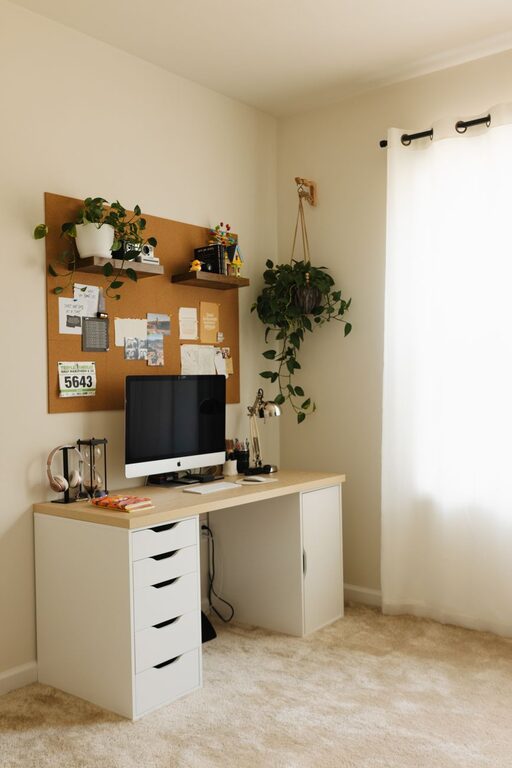
Creating a home workspace that strikes the perfect balance between cozy and functional can greatly enhance your productivity and overall well-being. Whether you work from home full-time, study remotely, or simply need a dedicated area for managing tasks, an inviting and efficient workspace is key. Here are some helpful tips to guide you in designing a home workspace that feels comfortable and supports your daily activities.
1. Choose the Right Location
Consider natural light
A spot near a window can bring in natural light, which boosts mood and reduces eye strain. Try to position your desk where you can enjoy daylight without glare on your computer screen.
Minimize distractions
Pick a quiet corner or room where you can focus without frequent interruptions. If your home is busy, consider noise-cancelling headphones or soundproofing options.
2. Invest in Ergonomic Furniture
Supportive chair
Choose a chair that supports your posture and provides comfort for extended sitting periods. Adjustable height and lumbar support are important features.
Functional desk
Select a desk that fits your space and needs. If possible, consider a standing desk or one with adjustable height for flexibility.
3. Optimize Your Lighting
Layer your lighting
Combine different types of lighting: ambient light for overall brightness, task lighting for focused work, and accent lights for warmth. Adjustable desk lamps are great for reducing eye fatigue.
Use warm light tones
Soft, warm lights create a cozy atmosphere, helping you feel relaxed while working.
4. Organize for Efficiency
Declutter regularly
Keep only essential items on your desk to maintain a clean, distraction-free surface. Use drawers or containers to store supplies.
Use storage solutions
Shelves, filing cabinets, and desktop organizers help keep important documents and tools within reach, making your workflow smoother.
5. Personalize Your Space
Add plants
Indoor plants bring life to your workspace. They improve air quality and provide a touch of nature that can boost creativity.
Incorporate meaningful decor
Display art, photos, or objects that inspire you. Personal touches make the space welcoming, motivating you to spend time there.
6. Pay Attention to Technology
Reliable equipment
Invest in a good quality computer, monitor, keyboard, and mouse to reduce strain and ensure smooth work sessions.
Cable management
Use clips, sleeves, or boxes to organize cables and keep your area tidy.
7. Create Zones for Different Tasks
Separate areas
If space allows, designate areas for different activities like computer work, reading, or brainstorming. This helps your brain switch gears more easily.
Comfortable seating
Include a small chair or couch for breaks or informal work, enhancing comfort and flexibility.
8. Prioritize Comfort and Ambiance
Temperature control
Ensure your workspace stays at a comfortable temperature. A fan or heater might be necessary depending on the season.
Soft textures
Use rugs, cushions, or blankets to add warmth and softness, making your workspace inviting and cozy.
Conclusion
Designing a cozy and functional home workspace doesn’t require a large budget or complicated renovations. By choosing the right location, investing in ergonomic furniture, optimizing lighting, and organizing efficiently, you can create a space that enhances both comfort and productivity. Personalize the environment with plants and decor, manage your technology thoughtfully, and consider creating different work zones for various tasks. Little changes can make a big difference in how you feel and perform throughout your workday. Enjoy making your workspace a place you look forward to using every day!